For any suggestions or feedback regarding these notes,
please contact Pragy Agarwal
The Update Problem
SQL
SQL has a strong, explicit schema
In SQL databases, data is stored in tables. Each table has a defined schema:
CREATE TABLE users (
id integer PRIMARY KEY,
name varchar(20),
age smallint
);
The schema tells the database:
- what tables exist
- what columns exist in each table
- what type each column has
- what constraints each column has
For example:
id -> integer
name -> varchar(20)
age -> smallint
This is called schema-on-write: whenever data is inserted or updated, the database checks whether the new data follows the schema.
INSERT INTO users (id, name, age)
VALUES (1, 'Abdur', 20);
The database checks:
- Is id an integer?
- Is name within 20 characters?
- Is age a valid smallint?
- Is id unique?
2. Data type does not always mean fixed-size storage
A common misconception is that varchar(20) means the database always reserves 20 bytes for the column in every row. That is generally not true.
Value in name | Fits varchar(20)? | Storage implication |
Abdur | Yes | Short value; variable-length storage usually stores only the actual value plus metadata. |
Abdur Rehman | Yes | Larger than Abdur, but still within the varchar(20) constraint. |
Abdur Rehman Ibne Munir Bin Abdul Aziz | No | Too long for varchar(20); the database usually rejects the insert/update. |
Some data types are fixed-size, such as integer or smallint. But many types are variable-size, such as varchar, text, and varbinary. Therefore, two valid rows may occupy different amounts of physical storage even though they follow the same schema.
1 | Abdur | 20
2 | Abdur Rehman | 21
Real databases also store row metadata, null markers, transaction information, alignment padding, page headers, and index references. So the physical row size is not simply the sum of declared column sizes.
3. How updates work conceptually
Suppose we run:
UPDATE users
SET name = 'Abdur Rehman'
WHERE id = 1;
The database needs to:
- find the row
- check whether the new value follows the schema
- modify the row or create a new row version
- update relevant indexes
- make the change durable
- keep the database recoverable if a crash happens
This is not as simple as directly going to disk and overwriting the old value. Modern SQL databases combine a buffer pool, pages, indexes, a write-ahead log, transaction metadata, and background flushing.
4. Rows are stored inside pages
Databases usually do not read and write individual rows directly from disk. Data is stored in fixed-size blocks called pages.
Page 1
|-- row: id=1, name='Abdur', age=20
|-- row: id=2, name='Abdur Rehman', age=21
|-- free space
When the database needs to update a row, it usually loads the whole page into memory. The row is modified in memory first. The page is then marked as a dirty page.
Dirty page: A dirty page is a page that has changed in memory but whose modified version may not yet have been written back to the table or index file on disk.
5. Write-Ahead Log: the key idea
Before the database safely writes the modified page to the actual table or index file, it first records the change in a special append-only log called the Write-Ahead Log, or WAL.
WAL rule: The log record must reach durable storage before the modified data page is considered safely written. The log is written ahead of the actual data page.
In B-tree-based storage engines, data and index pages are updated in place. If a crash happens while only some pages have been written, the structure could become inconsistent. WAL prevents this by giving the database enough information to recover safely after a crash.
6. Update flow with WAL
A simplified update flow looks like this:
- User runs UPDATE users SET name = 'Abdur Rehman' WHERE id = 1;
- Database finds the relevant row and page, often using an index.
- The page is loaded into memory if it is not already in the buffer pool.
- The database checks schema constraints: Abdur Rehman fits inside varchar(20).
- The database modifies the page in memory and marks it dirty.
- The database writes a WAL record describing the change.
- The WAL is flushed to disk before the transaction is considered committed.
- The transaction commits.
- The actual table and index pages are flushed later by background processes.
UPDATE issued
↓
Find row/page
↓
Modify page in memory
↓
Write WAL record
↓
Flush WAL before commit
↓
Commit transaction
↓
Flush dirty data/index pages later
7. Why WAL is needed
A single update may affect multiple physical structures:
- the table page containing the row
- the primary key index page
- one or more secondary index pages
- transaction metadata
If the database directly overwrote these pages and crashed halfway, the database might become inconsistent. For example, the table row could be updated while the index is not updated, or a B-tree page split could happen without its parent page being updated.
With WAL, the database first records enough information to redo or recover the operation. After a crash, it can replay WAL records and bring the table and index files back to a consistent state.
8. WAL is not the main table storage
The WAL is usually not the final home of the row. The main row still belongs in the table and index files.
Structure | Purpose |
Table/index files | Main database storage |
WAL file | Recovery log used to reconstruct committed changes after a crash |
The WAL answers the question: if the database crashes before all changed pages are written, how do we reconstruct the committed changes?
9. Are updates applied in batches later?
Yes, but with nuance. The update is usually applied to the page in memory immediately, but the modified page may be written to disk later. This delayed writing can happen due to checkpointing, background writer activity, buffer pool eviction, memory pressure, or shutdown.
Before the transaction is committed, the WAL records for that transaction must be durable. That is the core safety guarantee.
10. What if the new value is too large?
Suppose we run:
UPDATE users
SET name = 'Abdur Rehman Ibne Munir Bin Abdul Aziz'
WHERE id = 1;
If name is defined as varchar(20), this value violates the schema. The database does not overflow into the next row. It usually rejects the update because the value is too large for the declared column limit.
Important: varchar(20) is a constraint on allowed values. It is not a promise that 20 bytes were preallocated for every row.
11. Variable-length updates
Consider this change:
Old value: Abdur
New value: Abdur Rehman
The new value is larger, but still fits varchar(20). Since varchar is usually variable-length, this may require more physical storage. The storage engine may handle this in different ways:
- use free space on the same page
- create a new row version elsewhere
- move large values out-of-line
- update pointers or indexes
- leave old row versions for later cleanup
- split or reorganize pages
So updates are not easy because space was fully preallocated. Updates are manageable because the storage engine knows how to modify pages safely, maintain indexes, and recover using WAL.
12. Adding a column
Suppose we run:
ALTER TABLE users
ADD COLUMN gender smallint;
Conceptually, the table changes from:
id | name | age
to:
id | name | age | gender
Physically, the database may not immediately rewrite every row. In many modern databases, adding a nullable column can be fast because existing rows can be treated as if the new column has NULL. The database can store this information in metadata.
13. Adding a column with a default value
ALTER TABLE users
ADD COLUMN country text DEFAULT 'India';
Older systems might rewrite every row to physically add the default value. Modern databases may optimize this by storing the default in metadata and returning it when old rows are read. However, not all schema changes are cheap.
14. Schema changes that may require table rewrite
Some changes may require rewriting many or all rows, for example:
ALTER TABLE users
ALTER COLUMN age TYPE bigint;
ALTER TABLE users
ADD COLUMN created_at timestamp DEFAULT clock_timestamp();
The correct statement is not: adding or deleting a column always rewrites the table. The correct statement is: some schema changes are metadata-only and fast; some require rewriting the table and are slow. It depends on the database and the exact ALTER TABLE operation.
NoSQL
NoSQL databases are mostly schemaless (or semi-structured / loose schema)
We don't know the size of a particular entry.
Key | Value | Entry Size |
item | 10 | 9 bytes |
preferences | { | 62 bytes |
contest:[id]:page[10] | [ {user_id: …, rank: …, submission_details: ..}, {user_id: …, rank: …, submission_details: ..}, … ] | 2Kb maybe? |
No Preallocation
NoSQL databases do not pre-allocate max-space for an entry.
They canNOT pre-allocate max-space. Because the possible maximum is just too large (redis: size limit for string is 500MB) => preallocating such large values will be a massive waste of space.
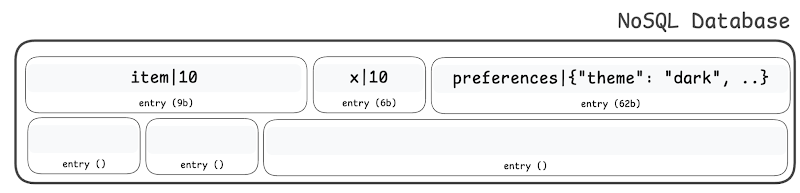
Updates
When we're updating an entry in NoSQL, then the size of the entry can change.
.png)
What happens if the value is larger than the allocated space?
Updating a value when the size has increased will cause overflow - it will end up overwriting the adjacent entry.
- Truncate: enforce that you can't update a value to a larger size: bad design - useless database
- Shift: all the subsequent entries to the right - ridiculously slow
Why is it okay to truncate large values in SQL but not in NoSQL?
In SQL, the developer decides the schema - the dev is aware & wants to enforce the max size. Truncation in SQL is not unexpected behavior.
In NoSQL the dev doesn't have any such schema. Truncation will be unexpected.
Therefore, in NoSQL database, it is impossible to update the value on the disk in the traditional manner!
Any entry inside a NoSQL database can only be appended - entries are immutable.
Challenge: how do you perform updates & deletes?
Log-Structured Merge (LSM) tree
Quick Persistence - WAL file
Any operation (insert/update/delete) should be durable - persisted on the disk.
Write-Ahead Log (WAL) file is an append-only file on the hard-disk. Any new write (insertion/deletion/updation) to the database is just appended as a new entry at the end of the WAL file.
Because the file is append-only, the writes are sequential. The write throughput is high.
WAL file acts as temporary storage. Data is committed & durable, but it has not yet been fully absorbed into the database (internal bookkeeping is pending).
WAL file has a max size (typically: 100MB)
Once the WAL file reaches max size ⇒ we must dump it into an SSTable.
.png)
Can we directly read from the WAL file?
Bad - WAL file is append only
- WAL file has duplicates
- WAL file is not sorted
- WAL file is large: 100MB
You will have to scan the entire 100MB to find the latest entry for the key.
Can we have some sort of an index to give us quick access to the data?
Yes, MemTable!
Read Cache - MemTable
MemTable is just a hashmap in the RAM.
(a lot of times, MemTable is also implemented as a BBST Tree or a sorted linked list in RAM)
While the writes must mandatorily go to the disk (durability), the reads can be served from the RAM (for ultra-high throughput).
We will maintain an in-memory hashmap => MemTable
MemTable acts as an in-memory cache.
- Invalidation: write-through cache, but it is super simple (no 2PC) because the entire LSM tree is within a single server.
if the DB is sharded, then each shard will build its own LSM tree - Eviction: Least Recently Used (LRU) eviction
.png)
The maximum size of the MemTable will be limited by the DB server's RAM. The more RAM we have, the larger the db-internal cache.
Typically, the size of the MemTable is kept larger than the max size of the WAL file (simplifies our eviction & read queries)
Long Term Persistence - SSTables
SSTables are also files on the hard disk.
Sorted String (SS) Table: when the WAL file gets full, we dump it into a new SSTable.
SSTables are immutable! Once created, they’re NEVER updated.
They can be deleted (during compaction), but we NEVER insert/update in them.
Note that the compaction process can delete old tables and create new ones. But it will never “edit” a table.
The entries inside the SSTable are sorted by the key.
Entries inside the SSTable have no duplicates (we deduplicate the WAL file data before dumping in the SSTable)
.png)
Q: Can there be duplicate entries in the SSTables?
A single SSTable is deduplicated and sorted by key.
However, it is possible to have duplicate entries for the same key across different SSTables.
.png)
Any old entries of the key will be "overridden" by the latest write.
Old entries of the key are now redundant.
Removing Redundancies - Compaction
Whenever we've multiple SSTables, there's a possibility of having duplicate (redundant) entries across them, which leads to space wastage.
We therefore need to remove the duplicates.
Additionally, for reads, we have to scan the SSTables one by one, so we don't want the number of SSTables to be large. Therefore, we need compaction to reduce the number of SSTables.
We will take 2 consecutive SSTables and we will merge them into a single SSTable.
While merging, note that we can use the Merge algorithm from merge sort (because each SSTable is individually sorted by key). However, for duplicate key entries, instead of taking both entries, we will just take the latest entry.
Note that after compaction the original SSTables get deleted.
.png)
Q: When does compaction happen?
Compaction requires at least 2 tables on the same level.
If there's 2 tables on the same level, we can compact them to the next level.
Compacting happens in the background during the usual database operations. There's no downtime.
However, compaction is expensive (reads, writes, deletes on disk)
Therefore, we don't usually do compaction immediately when there's 2 tables on the same level.
Compaction can be done according to
- amount of tables (tableCountThreshold)
- time passed (compact at every midnight)
- low load time (when the load is minimum or below a threshold, detect it, and start compacting)
- ...
Most Common Compaction Strategies
- Levelling: the moment you get 2 SSTables on a level, you trigger compaction. tableCountThreshold = 2
- Tiering: there can be more than 2 SSTables on a level - you maintain a compaction threshold tableCountThreshold > 2
The compaction strategy is decided differently for each level.
Poorly tuned compaction can make or break the database performance. You've to be careful while choosing the compaction strategy.
Note that you don't have to read the entire file into RAM while compacting, you can do it in a streaming manner (because the tables are sorted).
Q: Can we compact across levels?
Typical WAL size = 100MB
size SSTable on Level 1 <= 100MB (because it is compacted from the WAL file)
size SSTable on Level 2 <= 200MB (because it is compacted from 2 SSTables from Level 1)
size SSTable on Level 3 <= 400MB (because it is compacted from 2 SSTables from Level 2)
...
No! That’s not recommended, because across levels, the file sizes differ significantly. So compaction will be inefficient
.png)
Resources (optional)
- LSM-Tree Compaction Visualization
- An In-depth Discussion on the LSM Compaction Mechanism - Alibaba Cloud Community
- Raphael Carvalho — Building state-of-art LSM-tree compaction in ScyllaDB